
TL;DR for leaders: on the same 1 vCPU / 2GB container, an ASP.NET Core endpoint written with correct async/await sustained roughly 9 times the request rate of an identical endpoint that blocks on the same call (.GetAwaiter().GetResult() instead of await), before the bad version collapsed entirely under load. At 2,000 requests/second, that’s the difference between 1 container and 9, or roughly $12/month versus $112/month on Azure App Service for the compute alone, scaling worse the more traffic you add. The code difference between the good and bad versions is a single line. This is a measured result from a benchmark you can run yourself, not a vendor estimate; see “Caveats” below for what it does and doesn’t tell you about your own system.
I ran into this years ago, when Node.js was still new. A developer I was talking with was genuinely puzzled: his Node service handled concurrent traffic far better than the full-framework ASP.NET projects he’d been building. It wasn’t that Node was some faster runtime working magic under the hood; it was the non-blocking model. His process kept the event loop free while waiting on I/O, while much of the .NET code from that era (classic ASP.NET on IIS and the full .NET Framework, not today’s ASP.NET Core) was still blocking threads on database calls and HTTP requests without anyone quite noticing. That conversation stuck with me, because the same principle is exactly what async/await, and the leaner minimal API style in modern ASP.NET Core, make easy and idiomatic in C# today. The win was never that any single request got faster; it’s that the same handful of threads can serve far more requests at once, which is the whole game once you’re paying for compute by the container. Here’s what that actually costs you when you get it wrong.
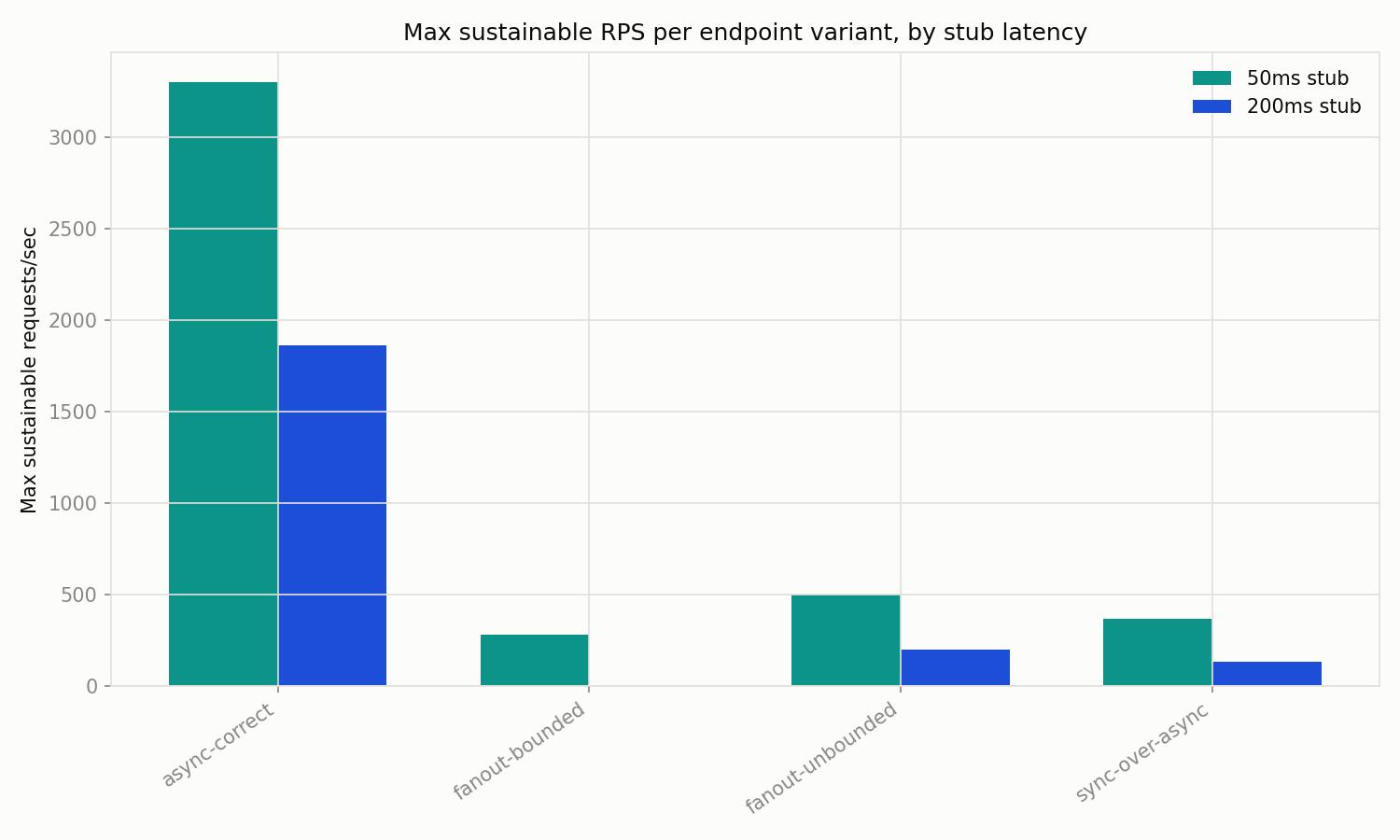
The benchmark
The API is an ASP.NET Core 10 minimal API with eight endpoints, each doing identical business logic (one downstream HTTP call, or in the fan-out cases, several) but handling concurrency differently: async-correct, sync-over-async, blocking-sync, fanout-unbounded, fanout-bounded, async-no-cancellation, async-with-cancellation, and a cpu-bound control that does no I/O at all. A separate stub service simulates a downstream dependency with a fixed, configurable latency (50ms or 200ms). The API container is constrained to 1 vCPU / 2GB; the stub is unconstrained.
- async-correct: awaits the downstream call properly; the baseline everything else is measured against.
- sync-over-async: calls the same async client but blocks on it (
.GetAwaiter().GetResult()). - blocking-sync: a genuinely synchronous HTTP call, no async anywhere.
- fanout-unbounded: fans out 10 downstream calls at once with
Task.WhenAll, no cap. - fanout-bounded: same fan-out, capped at 4 concurrent calls with a
SemaphoreSlim. - async-no-cancellation / async-with-cancellation: same async call, with and without passing the request’s cancellation token through.
- cpu-bound: a control endpoint doing fixed CPU work, no I/O at all.
I defined “sustainable” the same way everywhere: p95 latency (the latency 95% of requests beat; a cleaner read on real user pain than an average, which gets washed out by the fast majority) under (stub latency + 250ms) and an error rate under 1%, both checked with k6. For the 50ms stub that’s p95 under 300ms; for 200ms, under 450ms. Load ramps through a set of concurrency steps and I took the highest step that still met the rule as the max sustainable RPS for that variant.
The load generator (k6, in its own container) ran on the same physical host as the constrained API container, not on separate hardware. That’s a real limitation; see “Caveats”.
Full companion code, including the orchestration scripts, cost model, and raw results, is at companion-code/async-await-web-api-cloud-costs/ in this blog’s repository. Everything runs in Docker; no local .NET SDK, k6, or Python install is required.
The code
Sync-over-async
The business logic is identical to the correct version. The only difference is this:
// async-correct
using var response = await downstream.GetAsync(latencyMs, ct);

// sync-over-async
using var response = downstream.GetAsync(latencyMs, CancellationToken.None).GetAwaiter().GetResult();
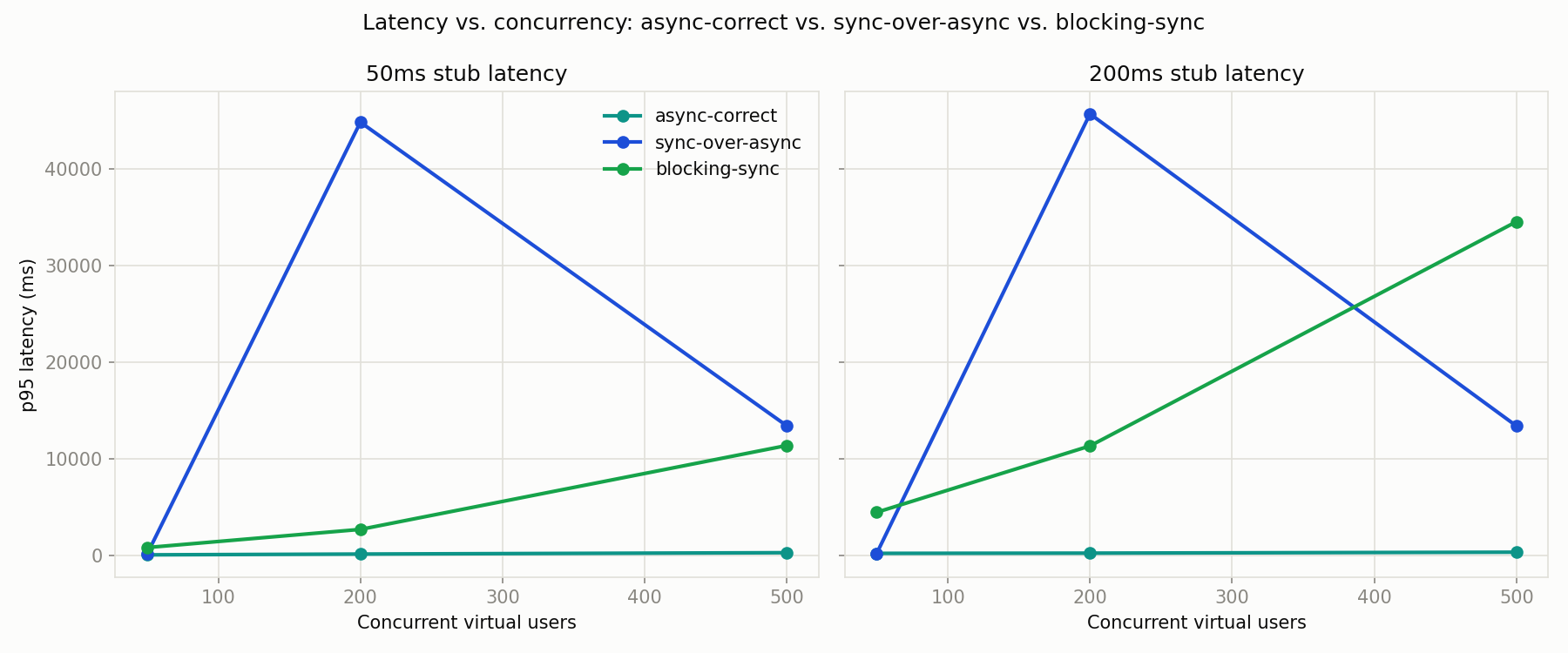
At low concurrency (50 virtual users) this barely shows: sync-over-async still met the sustainability bar, at 367 requests/sec against the 50ms stub versus async-correct’s 845. Push to 200 concurrent users and it falls apart: throughput for sync-over-async crashed to under 5 requests/sec with p95 latency past 44 seconds, while async-correct kept climbing to over 2,300 requests/sec. Blocking a thread pool thread while it waits on another thread pool thread (the classic sync-over-async deadlock-adjacent pattern) doesn’t degrade gracefully, it falls off a cliff once the thread pool can no longer keep up with injecting new threads fast enough.
Interestingly, the naive blocking-sync variant (a genuinely synchronous HTTP call, no async anywhere) never collapsed as completely as sync-over-async did, it just stayed slow (p95 over 800ms even at 50 concurrent users, never meeting the threshold). It ties up one real OS thread per request rather than compounding thread pool starvation the way sync-over-async does, so it’s bad from the start but doesn’t have the same catastrophic cliff. Both are wrong; they’re wrong in different ways.
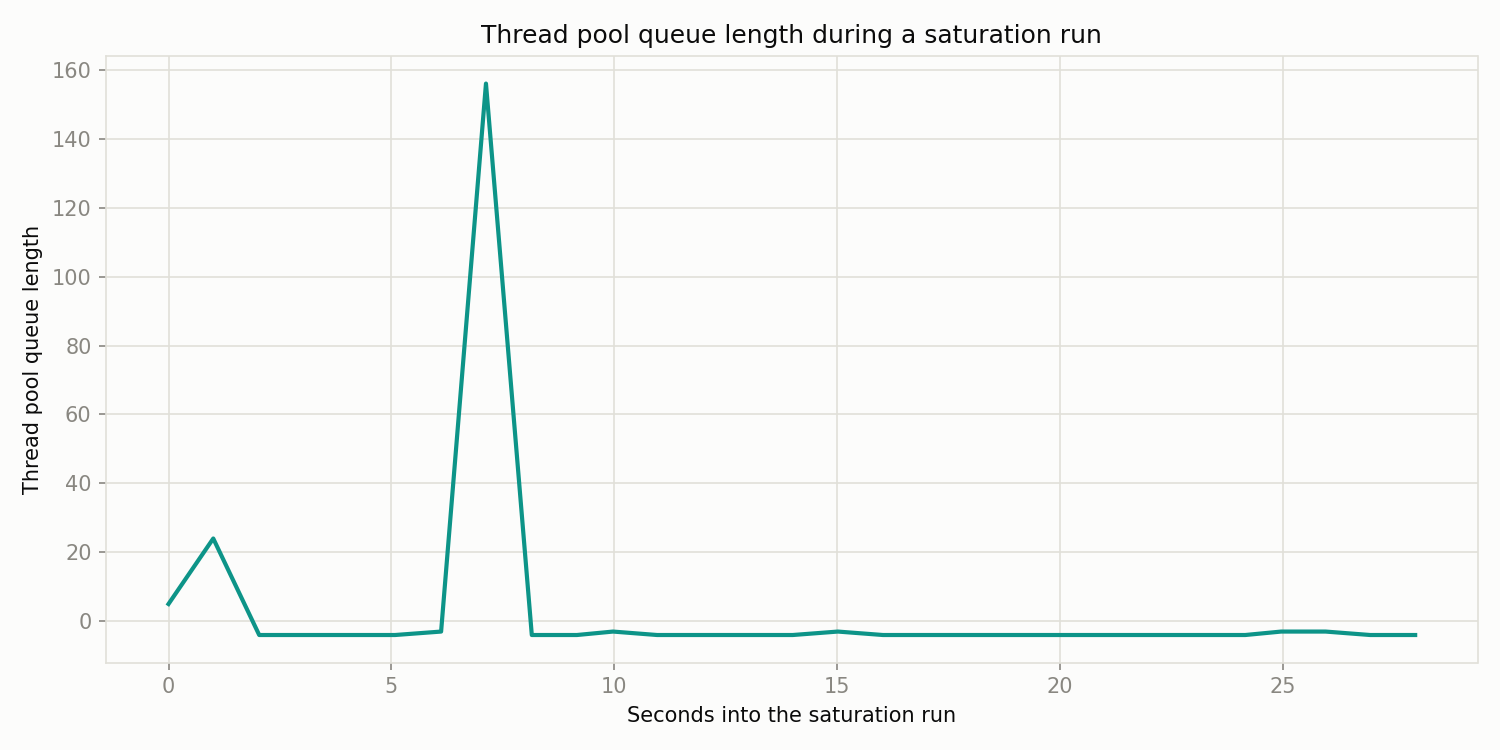
Watching System.Runtime’s thread pool counters during a saturating sync-over-async run shows exactly what’s happening server-side: queue length spikes hard as the thread pool scrambles to inject threads fast enough, then drains once it catches up (or once k6 backs off).
Unbounded fan-out
// fanout-unbounded
var tasks = Enumerable.Range(0, count).Select(_ => downstream.GetAsync(latencyMs, ct));
var responses = await Task.WhenAll(tasks);

// fanout-bounded
using var gate = new SemaphoreSlim(maxDegree);
// ... each call waits on the gate before calling downstream, releases after
Both fan-out variants call the downstream dependency 10 times per request; fanout-bounded caps concurrent downstream calls at 4 with a SemaphoreSlim, fanout-unbounded doesn’t. At low concurrency, unbounded actually sustained more throughput than bounded (500.6 vs. 281.6 requests/sec against the 50ms stub). Capping concurrency per request adds latency (more sequential batches) without buying back server capacity, because the real constraint here is the API container’s thread pool and CPU, not the number of simultaneous outbound sockets. Neither variant stayed sustainable once concurrent users climbed past 50 in this run. The lesson isn’t “don’t bound fan-out” (unbounded fan-out is still a real risk under truly bursty traffic, and a slow or flaky downstream makes the unbounded case worse than this benchmark shows), it’s that bounding concurrency inside one request doesn’t substitute for right-sizing or scaling the service handling the requests.
Missing cancellation
// async-no-cancellation
using var response = await downstream.GetAsync(latencyMs, CancellationToken.None);

// async-with-cancellation
using var response = await downstream.GetAsync(latencyMs, request.HttpContext.RequestAborted);
To make the cost of ignoring cancellation visible, k6 aborted 20% of requests mid-flight against both variants. That abort rate alone pushes both endpoints past this benchmark’s 1% error-rate bar by design, so neither shows up as “sustainable” in the table below. That’s an artifact of the test design, not a finding about cancellation, so the real comparison is throughput under that same abort load, not sustainability.
Here, async-with-cancellation (which threads HttpContext.RequestAborted through to the downstream call) actually sustained lower peak throughput than async-no-cancellation: 2,190 requests/sec versus 3,231 at 500 concurrent users against the 50ms stub. That’s the opposite of what I expected going in, and the reduced matrix (one repetition, no direct count of downstream calls actually cancelled versus completed) isn’t enough to say why with confidence. The takeaway is that cancellation propagation is still worth doing, since abandoned work keeps consuming downstream capacity and server resources if you don’t cancel it, but this run doesn’t cleanly prove the magnitude, and I’d rather flag that than glance past it.
Cost translation
Translating sustainable RPS into instance counts and dollars, at a target of 2,000 requests/second:
| Endpoint | Stub latency | Sustainable RPS/instance | Instances needed | Azure App Service $/mo | AWS Fargate $/mo | AWS Lightsail $/mo | Ratio vs. best |
|---|---|---|---|---|---|---|---|
| async-correct | 50ms | 3,298.1 | 1 | $12 | $36 | $12 | 1.0x |
| async-correct | 200ms | 1,861.4 | 2 | $25 | $72 | $24 | 2.0x |
| fanout-unbounded | 50ms | 500.6 | 7 | $87 | $252 | $82 | 7.0x |
| sync-over-async | 50ms | 367.4 | 9 | $112 | $325 | $106 | 9.0x |
| fanout-bounded | 50ms | 281.6 | 11 | $137 | $397 | $130 | 11.0x |
| fanout-unbounded | 200ms | 199.0 | 16 | $199 | $577 | $188 | 16.0x |
| sync-over-async | 200ms | 135.0 | 23 | $286 | $830 | $271 | 23.0x |
blocking-sync, cpu-bound, and both cancellation variants don’t appear here: none of them hit a sustainable data point anywhere in the tested concurrency range, so there’s no “RPS per instance” to price. That’s itself informative. See results/cost_table.md and results/summary.csv in the companion repo for the full table at 1,000, 5,000, and 20,000 RPS targets too, and every underlying number.
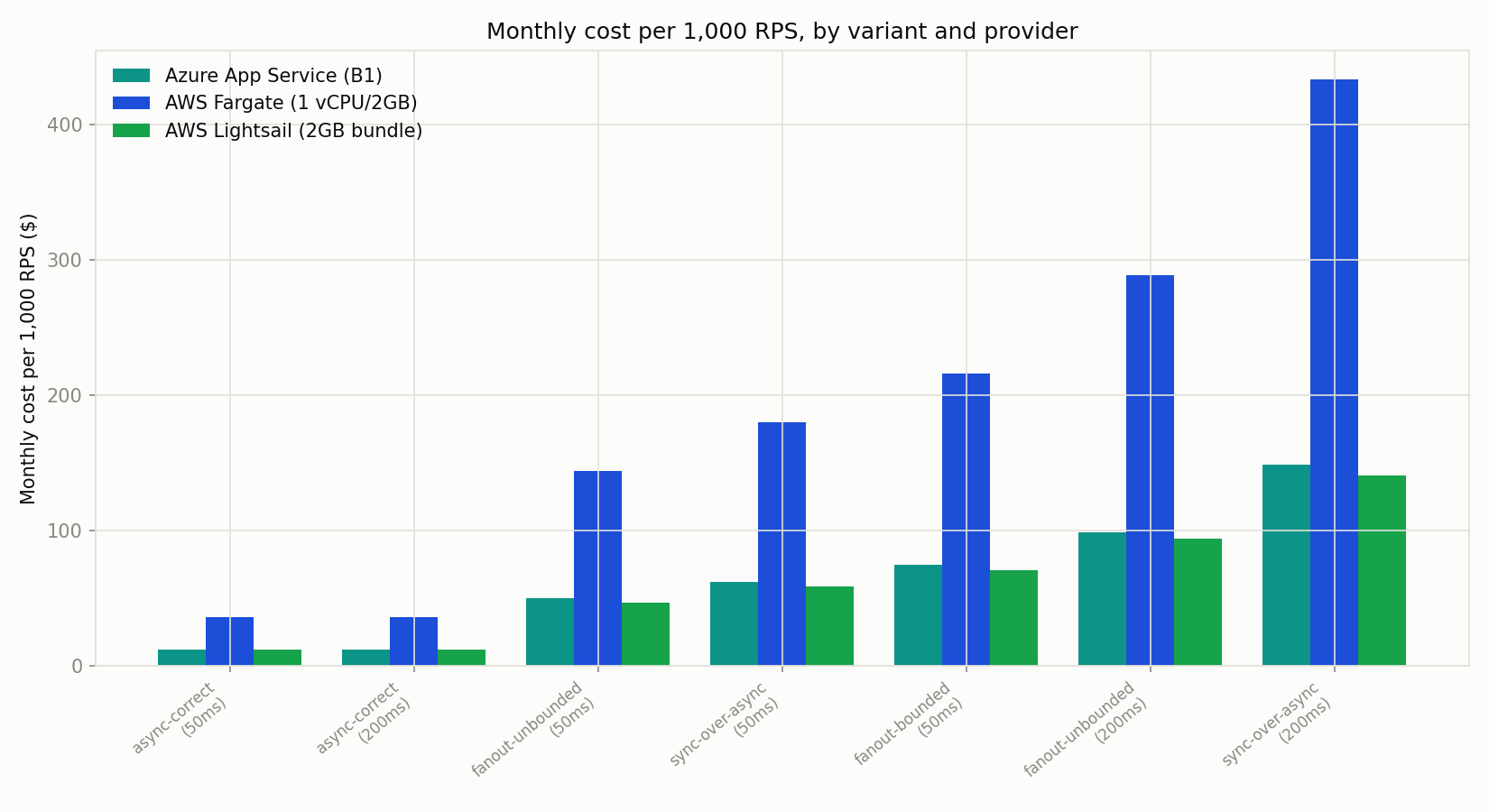
To be clear about what’s measured and what’s estimated here: the instance counts above are an estimate, not a cloud deployment test. I took the sustainable-RPS-per-instance numbers measured on local Docker containers (see “Caveats” below) and divided them into a target request rate; no code in this benchmark ever ran on Azure or AWS. Only the dollar figures are live: prices were fetched from the Azure Retail Prices API and AWS’s public Fargate and Lightsail price lists on 2026-10-27, region eastus (Azure) / us-east-1 (AWS), on-demand rates only, not reserved instances or savings plans. The Azure comparison uses a Basic B1 Linux plan (1 vCPU, 1.75GB), the closest published tier to the benchmark’s 1 vCPU / 2GB container and a tier a small team would plausibly actually run. AWS Fargate is priced for an exact 1 vCPU / 2GB task. AWS Lightsail is priced using its “2GB” standard Linux bundle, the closest published bundle by RAM; as of this writing AWS’s smallest standard Lightsail bundles are all 2 vCPU rather than 1, so that comparison is generous to Lightsail, not an exact match. See results/prices.json in the companion repo for the raw data.
When it doesn’t help
The cpu-bound control endpoint does no I/O at all, just a fixed, deterministic chunk of CPU work (a chained SHA-256 loop calibrated to roughly 50ms of CPU time). Async/await has nothing to offer it: on a 1 vCPU container, p95 latency scaled almost linearly with queue depth, from about 2.2 seconds at 50 concurrent requests to about 25 seconds at 500, because every request is genuinely competing for the same single core with no idle time to reclaim. This is expected, not a bug, and it’s the control that keeps the rest of this post honest: the gains above come from reclaiming idle time while threads wait on I/O, not from a general performance trick. If your bottleneck is CPU, not waiting, rewriting for async/await won’t move the needle, and might even add a small amount of overhead for nothing.
If your service runs at modest traffic, or you’re weighing the engineering cost of migrating a working but inefficient codebase, the calculus changes: a rewrite that saves two App Service instances a month doesn’t justify itself in a week of billable migration work. Measure your own traffic and your own team’s velocity before chasing this.
How to find this in your own system
A few signals are worth checking before you assume this is costing you anything:
- Thread pool starvation symptoms: requests queueing with high p95/p99 latency while CPU usage on the box stays low or moderate. CPU-bound work looks the opposite: high CPU, latency tracks roughly linearly with load.
dotnet-counters: attach to a running process (dotnet-counters monitor -p <pid> --counters System.Runtime) and watchThread Pool Thread CountandThread Pool Queue Lengthunder load. A queue length that climbs and doesn’t drain is the smoking gun.- APM traces: look for spans where the reported “wait” or “queue” time dwarfs actual work time, especially on endpoints that call downstream HTTP services.
Caveats
This was run on a single development machine, not isolated cloud hardware: the load generator shared the host with the constrained API container, and the numbers reflect one CPU generation under Docker Desktop, not a clean cloud VM. Treat the absolute RPS figures as directional, not a guarantee of what you’ll see in production; the relative comparison between variants, measured under identical conditions, is the part worth trusting. See results/environment.md in the companion repo for exact specs.
This also isn’t the full planned benchmark matrix. See the post’s methodology section and the companion repo’s README for exactly what was reduced and why, and how to run the full matrix yourself.